
Everything you get for your grooming salon
Appointments, clients, team and payments. All of the module's features are included in every plan; usage limits are listed on the pricing page.
Calendar, clients and payments
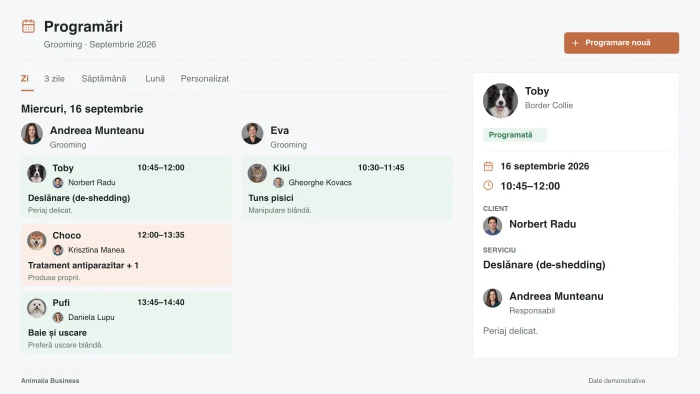
Each groomer's schedule, in plain view
Choose the day, three-day, week or month view. Move appointments, set service durations and block the team's breaks.
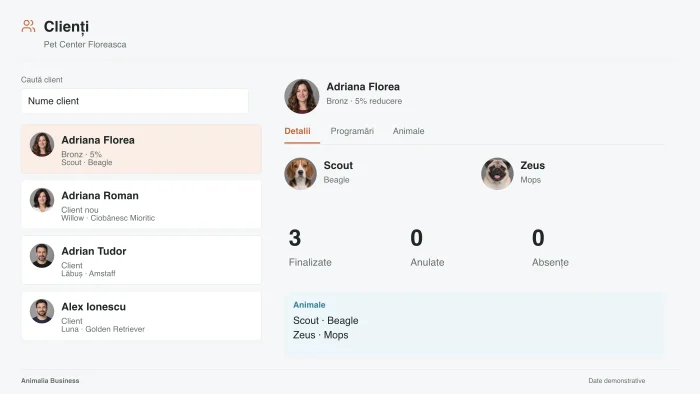
The details that make a difference at the next visit
Keep grooming preferences, notes and contact details. The photos from each appointment add to the pet's history.
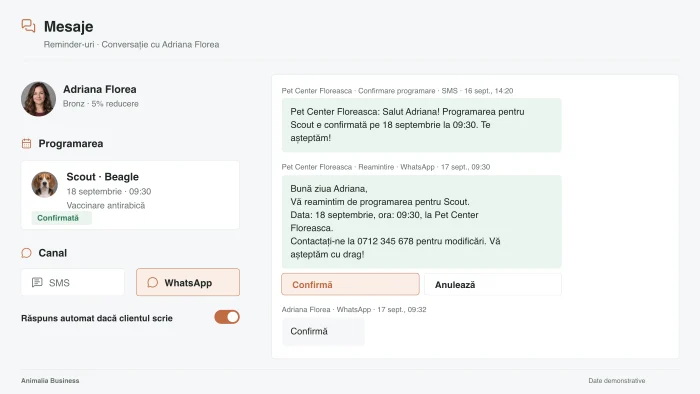
Confirmation comes straight from the message
The client gets the reminder by SMS or WhatsApp and can confirm or cancel. You follow the replies in the calendar.
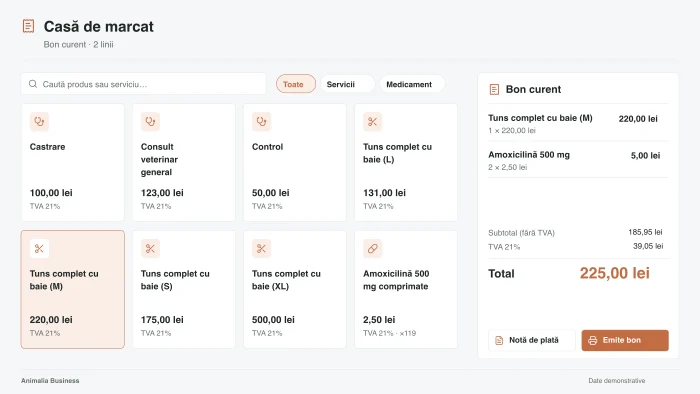
From the deposit to the final payment
Set a fixed or percentage deposit, paid online through Stripe. At the end of the visit you issue the invoice and, with a connected fiscal cash register, the fiscal receipt.
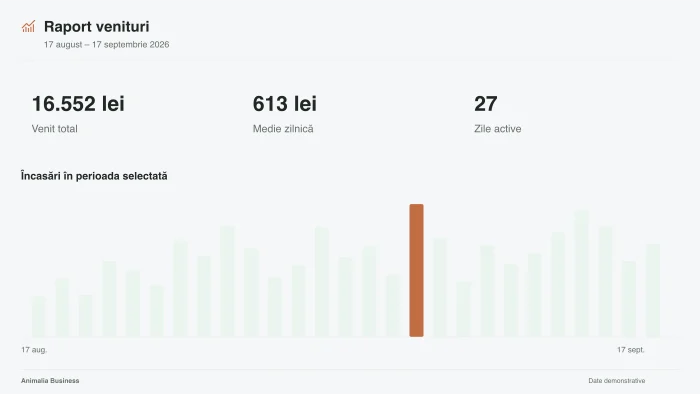
The salon's revenue, by service and by team member
Choose the period and follow team activity, commissions and requested services. You also see the slots left open.
Clients, team and payments
Clients and pets
Keep contact details, pets and visit history in the same database. The modules use the same profiles, so you don't re-enter information.
Client groups and filters
Find clients by pet species, last visit or loyalty tier. Combine filters to get the selection you need.
VIP tags and notes
Mark VIP clients and keep notes that only your team can see, on the client's profile.
Clients who haven't been back
Choose the inactivity period and see the clients you can contact for a new visit.
Team accounts
Each team member has their own account, profile and work schedule. You manage them all from one place.
Roles and permissions
Set who can view or change appointments, clients, reports and settings. Fit the roles to your team's responsibilities.
Work schedule by team member
Set working hours and breaks. Each team member's availability is taken into account for online booking.
Rates by team member
You can set different prices by person or experience level. The client sees the rate for the option they pick.
Rates by pet size
Set each service's price by size. At booking, the rate that fits the pet applies.
Add-on services
Add options next to the main service, each with its own price and duration. Clients can pick them when booking online.
Online booking
Clients pick the service, the team member and an available time. You decide whether to accept requests automatically or approve them one by one.
Your business page
Show your services, photos and contact details on a page with its own link. Listing in Animalia Booking is optional.
Online deposit through Stripe
Ask for a fixed amount, a percentage or full payment. You set the refund policy for cancellations.
Automated messages
Choose the events that trigger confirmations, reminders and after-visit messages, and the channels available.
SMS and WhatsApp campaigns
Write the message and choose the recipients: all clients, or a group selected with filters. You send the campaign from the app.
Review invitations
After the visit you can send a message with the link to your Google reviews page. Animalia reviews show on your public page.
Loyalty and digital cards
Set the loyalty tiers, the number of visits and the discounts. The client's card updates based on your rules.
Reports and statistics
Analyze revenue, appointments and your team's activity. Pick the period and export the data to Excel or CSV.
Invoices and e-Factura
You prepare the invoice with the services and prices from the appointment. It reaches e-Factura, Romania’s e-invoicing system, through your Oblio or SmartBill account.
Fiscal cash register
Issue fiscal receipts through a compatible fiscal cash register and driver. Connecting depends on the model, the driver and how the computer is set up.
Appointments and calendar
Appointment calendar
See the day, week, month or the list of appointments. Filter by team member and find the client, pet and services of each visit.
Appointment slots
Choose how online times are offered: calculated slots or fixed times. You can group appointments back to back to cut down gaps.
Recurring appointments
Create a series at the interval you set, for example every four weeks. You can edit, pause or stop the series.
Waitlist
See client requests for fully booked days. When a slot opens up, you can book a client from the list.
Breaks and days off
Block time for breaks, cleaning or time off, by team member or for the whole team. Those slots are no longer available for appointments.
Photos on the appointment
Attach photos before and after the service. You find them in the appointment details at the next visit.
Reminders before the visit
Choose how far ahead the message goes out by SMS or WhatsApp, and at what time.
What you get in the grooming module
- Online bookingClients choose the service and an available time.
- Automated messagesReminders and confirmations by SMS and WhatsApp.
- Clients and petsHistory, preferences and notes for every visit.
- ReportsPayments, clients and activity for each groomer.
- Data migrationWe help you switch to Animalia, with a free data transfer.
- Team and accessRoles and permissions for every team member.
Animalia Business guarantees
Free data migration
We move the data from the app you use now.
We check what can be exported from your current app and prepare the transfer together with you, so you start in Animalia with your clients and your history.
- We decide together what moves: clients, pets, history, appointments.
- How long it takes depends on the volume and format of the data. You know every step in advance.
- You pay nothing for the migration.

Personal account manager
One person on our team for everything you need.
You get an account manager from the Animalia team who knows your business and whom you can reach directly.
- They answer any question about the app.
- They take the features you need and bring them to the product team.
- They advise you on how to use Animalia to grow your business.

Website at half price
A premium website, built by the Animalia Studio team.
As long as you have an Animalia Business plan, Animalia Studio builds your website at half price. Our team builds it, connected to your appointments.
- Essential · 1 page
- 100 EUR instead of 200 EUR
- Complete · 6 pages
- 250 EUR instead of 500 EUR
- Hosting and maintenance are included while your plan is active.

Integration with your system
Using software we don’t connect to yet? We’ll connect it.
If you already use software that Animalia doesn’t connect to yet, we’ll build the integration for you.
- If it’s a system used by several businesses, the integration is free.
- If it’s a system only you use, we’ll work out together what it involves and what it costs.

iOS, Android and browser
The same app, on your phone and your computer.
Animalia Business is on the App Store and Google Play, and it works in the browser on any computer. Your account, appointments and clients are the same everywhere.
- At the front desk you work on a computer; next to the pet you work from your phone.
- You don’t install anything on your computer: you open the app in your browser.

Free demo and training
We show you the app and teach your team.
We show you Animalia live, on your own business workflow, in a free demo. Once you start, we teach your team to work in the app, also for free.
- The demo takes 30 minutes.
- Support in Romanian is available 24/7, including after training.

Works with what you already use
Billing and payments
Communication and calendar
Website and data
Businesses that chose Animalia Business
Urban Pets Grooming & Spa
„I answer the calls, I make the appointments, and I'm also the one who has to tell clients the dog is done. This app is life changing for me.”
OanaBucharest Pet Groom
„If I don't get along with someone, I can block that client so they can't book anymore. We have every right to choose our clientele too.”
ValiTimișoara Zootopia
„The classic way, booking in a paper diary, seems really hard to me. If you want to book something a month and a half ahead, you have to keep flipping through the diary pages.”
MarisaBucharest 
Groomer
„This app is very easy to use. Useful for every grooming salon.”
Cătălin 
Groomerie
AnnaBucharest 
Blue Pet Salon
Mihai 
Groom Zone Pet Spa
Amalia 
Pretty Pawfect
Diana